Black Wave Papercut Background
When you are staring at a blank canvas, whether it is a digital design file or a physical print layout, the challenge is rarely about finding an idea—it is about establishing the right mood. You need something that commands attention without shouting. This is where the Black Wave Papercut Background becomes an indispensable asset for creators who understand the power of negative space and depth. It is not just a picture; it is a structural element that adds sophistication to almost any project.
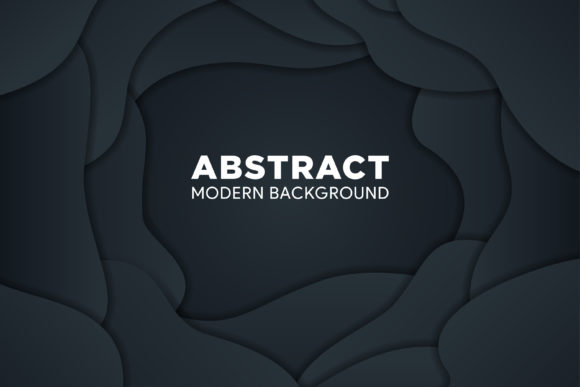
This specific design features a high-resolution, 300dpi gradient vector background with an abstract liquid style. Visually, it mimics the intricate layers of origami or carved cardboard, creating a sense of three-dimensionality on a flat surface. The horizontal layout provides a stable foundation, while the flowing, topographic lines guide the viewer’s eye across the composition. For designers, marketers, and hobbyists alike, this resource bridges the gap between modern minimalism and tactile artistry.
Why Depth Matters in Digital and Print Design
In a world saturated with flat, two-dimensional content, adding perceived depth is one of the most effective ways to capture interest. The black wave papercut effect achieves this through subtle shadows and layered gradients. Even though the file is entirely vector-based, the interplay of light and dark creates an illusion of physical texture. This is particularly useful when you want your design to feel premium or expensive without cluttering the visual field.
Consider the difference between a standard black background and one with this papercut texture. The former can feel heavy or void-like, often pushing text forward in a jarring way. The latter, however, offers a "soft" darkness. The flowing lines break up the monotony, providing a sophisticated frame for your primary content. Whether you are designing a website header, a business card, or a social media banner, this background ensures that your central message remains the hero while the supporting elements add professional polish.
Real-World Applications for Professionals
The versatility of this graphic resource allows it to fit seamlessly into various professional workflows. Here is how different users might apply it to solve common design problems.
For Entrepreneurs and Small Business Owners
If you run a boutique agency, a luxury brand, or a creative studio, your branding needs to reflect quality. A black and white color scheme is timeless, but it can easily look generic if not executed well. Using the Black Wave Papercut Background for your letterheads, invoice covers, or presentation slides adds a layer of exclusivity. The geometric precision suggests attention to detail—a trait clients value highly. Furthermore, because the file includes editable text and shapes, you can quickly adapt the layout for different document sizes without losing the integrity of the design.
For Marketers and Content Creators
Social media feeds are crowded. To stop the scroll, you need visuals that stand out from the typical colorful influencers or bright product shots. A monochromatic, abstract background offers a stark contrast that feels editorial and high-fashion. Use this template for Instagram story backgrounds, YouTube thumbnails, or promotional banners for webinars. The horizontal layout is particularly effective for desktop websites and email headers, ensuring that call-to-action buttons pop against the dark, textured backdrop. The smooth gradient prevents the black from feeling too harsh, keeping the user experience comfortable rather than aggressive.
For Educators and Publishers
Even in educational materials, aesthetics play a role in engagement. Teachers and instructional designers often struggle to make digital worksheets or slide decks look less like "homework" and more like professional reports. Incorporating this abstract vector background can elevate the tone of a lesson plan or a research summary. It works exceptionally well for topics related to science, mathematics, or architecture, where geometry and structure are relevant themes. The clean lines and map-like topography can subtly reinforce concepts of flow, connection, and complexity.
Technical Advantages for Designers
Beyond the visual appeal, the technical specifications of this file make it a practical choice for busy professionals. In the fast-paced world of freelance work or in-house marketing, time is money. You do not have time to recreate complex textures from scratch every time a new campaign launches.
- Vector Scalability: Because all graphics are 100% vector (Ai and EPS formats), you can scale this background to any size—from a tiny favicon to a massive billboard—without losing resolution. There is no pixelation, which is crucial for print materials that require sharp edges.
- Editability: The file is well-organized, meaning you can easily isolate specific layers. If you want to change the intensity of the shadow or adjust the curve of a wave, you can do so directly within Adobe Illustrator or other compatible software. The ability to edit colors means you can tweak the black to match a specific brand hex code if needed, though the deep black gradient is designed to be universally appealing.
- High Resolution: At 300dpi, this resource is print-ready. Whether you are ordering glossy postcards, matte brochures, or large-format posters, the output will be crisp. The JPG preview allows for quick visualization, but the source files ensure you have full control over the final product.
How to Integrate It Into Your Workflow
Using this background effectively requires a bit of strategic placement. Since the design is rich in texture, it works best as a container rather than the main subject. Here are a few practical tips for getting the most out of this asset:
- Contrast is Key: When placing text over this background, use white or very light gray fonts. Avoid colored text unless it is a vibrant accent color that contrasts sharply with the black. The goal is readability first, aesthetics second.
- Leave Breathing Room: Do not cover the entire design with opaque blocks. Allow some of the flowing waves to show through, especially near the edges. This creates a natural frame that draws the eye inward toward your core message.
- Mix with Photography: This background pairs beautifully with black-and-white photography. Imagine a real estate listing where the property photo is overlaid on the left, and the details are on the right against the papercut texture. The cohesive monochromatic theme ties the two disparate elements together.
- Use for Physical Products: Don't limit yourself to digital screens. This design is perfect for greeting cards, wedding invitations, or product packaging labels. The "carved" look mimics actual die-cut paper, giving your physical products a handmade, artisanal feel even if they are mass-produced.
What to Consider Before Downloading
While this resource is highly adaptable, it is important to choose the right format for your needs. If you are working in Canva or a similar browser-based tool, the SVG or JPG versions will be sufficient for most basic edits. However, if you are a professional designer using Adobe Creative Cloud, the Ai and EPS files are essential. They provide the layer structure and editable paths that allow for true customization.
Additionally, consider the context of your audience. A black, abstract background conveys seriousness, elegance, and modernity. It may not be the best fit for children’s toys, playful pet brands, or eco-friendly organic products where green and earth tones are expected. However, for tech startups, law firms, fashion brands, and creative agencies, it hits the sweet spot of contemporary design trends.
Ultimately, the Black Wave Papercut Background is more than just a decorative element. It is a tool that helps you communicate professionalism and creativity simultaneously. By leveraging its vector flexibility and aesthetic depth, you can save time on design iterations and produce materials that look polished and intentional. Whether you are crafting a personal portfolio, a corporate report, or a viral social media post, this resource provides a solid foundation for success. Take advantage of the included support and documentation to ensure you get the most out of your download, and enjoy the creative freedom that comes with having such a versatile graphic at your fingertips.