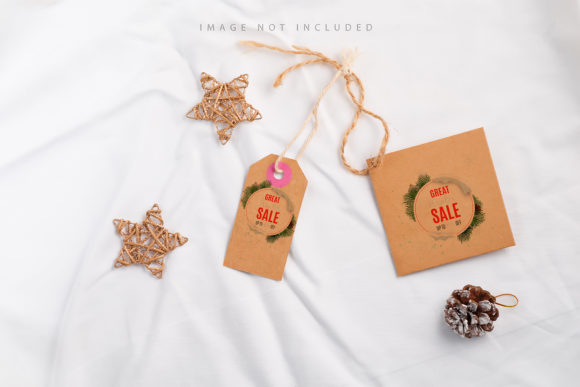
Two Labels with a Rope Isolated on White
In the realm of digital design, efficiency is often measured by how quickly a creator can transition from concept to final deliverable without compromising visual integrity. For professionals working in branding, packaging, or e-commerce, the ability to present ideas realistically is just as critical as the design itself. This is where high-quality mockups serve as an indispensable tool. Among these resources, the asset known as Two Labels with a Rope Isolated on White stands out not for its complexity, but for its focused utility and user-friendly architecture. It represents a streamlined approach to product visualization, designed specifically for those who need to showcase label designs in a clean, professional context.
This particular mockup features two distinct labels suspended by a rope against a stark white background. The simplicity of the composition is intentional. By removing environmental distractions, the focus remains entirely on the typography, color palettes, and graphic elements of the labels themselves. However, beneath this simple exterior lies a sophisticated technical structure that prioritizes workflow speed and precision. Understanding the mechanics behind this asset helps designers evaluate whether it fits their specific project requirements.
Technical Specifications and File Structure
Before diving into the creative applications, it is essential to understand the technical foundation of the file. The Two Labels with a Rope Isolated on White mockup is provided in Adobe Photoshop format (.psd), ensuring compatibility with the industry-standard software used by most graphic designers. The resolution is set at 6016×4016 pixels, which provides ample pixel density for both screen-based presentations and high-resolution print outputs. At 300 DPI, the image maintains crisp edges and smooth gradients, preventing any blurriness when scaled down for web use or enlarged for large-format displays.
The core strength of this asset lies in its use of Smart Objects. In modern Photoshop workflows, Smart Objects allow designers to embed external files directly into a layer while preserving the original quality. When you place your own design into the designated area, the mockup automatically maps your artwork onto the curved surfaces of the labels. This eliminates the tedious process of manually warping, distorting, or masking images to fit a perspective. Instead, the transformation happens dynamically, updating in real-time as you edit your source file.
Understanding the Safety Zone Feature
One of the most practical yet often overlooked features in premium mockups is the inclusion of a "Safety Zone." In the case of Two Labels with a Rope Isolated on White, this feature is integrated directly into the smart object layer. A safety zone refers to the visible boundaries within the label area where your design content should remain. Any text, logos, or critical graphical elements placed outside this zone may be obscured by shadows, folds, or the curvature of the label surface.
To utilize this feature effectively, users simply need to activate the specific layer associated with the safety guide. These guides appear as subtle lines overlaid on the label, indicating the safe area for typography and key imagery. This is particularly useful for designers who are less familiar with perspective mapping. Without such guides, there is a risk of placing important information too close to the edge, where it might become illegible due to the natural wrapping of the label around the container or its suspension point. By providing these visual cues, the mockup reduces the trial-and-error phase of design placement, saving valuable time during the review process.
Real-World Application and Workflow Integration
The primary use case for this mockup involves presenting label designs for small businesses, artisanal products, or brand identity projects. Imagine a client who has developed a new line of organic jams, craft spirits, or cosmetic balms. They need to show their packaging concept to stakeholders or potential retailers. Using Two Labels with a Rope Isolated on White, the designer can drop their vector-based logo or raster-based illustration into the smart object, save the file, and instantly see how the design interacts with light and shadow on a realistic surface.
This is not a 3D render generated from scratch, nor is it a flat vector illustration. It is a photographic representation, which lends a tangible realism that pure digital renders sometimes lack. The lighting is soft and even, consistent with studio photography standards, making it suitable for a wide variety of aesthetic directions. Whether the design is minimalist and monochromatic or vibrant and intricate, the neutral white background ensures that the colors of the label do not clash with the environment. The background does not change color; it remains a constant, clean canvas that allows the design to speak for itself.
For freelancers and agency teams, this consistency is vital. When submitting proposals or portfolio pieces, having a reliable template that requires minimal adjustment means faster turnaround times. You can create multiple variations of a single brand identity—different colorways, font pairings, or layout adjustments—and generate presentation-ready images in minutes rather than hours. The active smart object ensures that every iteration looks polished, maintaining a high level of professionalism across all deliverables.
Limitations and Considerations
While the Two Labels with a Rope Isolated on White mockup offers significant advantages, it is important to acknowledge its limitations to set realistic expectations. First and foremost, the typography included in the preview is not part of the editable smart object. Designers must bring their own fonts and text layers. This is standard practice in the mockup industry, as it prevents licensing issues and allows for complete typographic freedom, but it does require the user to have the necessary font files installed on their system.
Additionally, because the mockup relies on a fixed photographic base, the perspective and angle of the labels are static. If a project requires the labels to be viewed from a dramatic low angle, wrapped around a cylindrical bottle, or attached to irregularly shaped packaging, this specific asset may not be suitable. It is best suited for flat or slightly curved label applications where the rope suspension creates a natural, gentle drape. Users seeking extreme flexibility in object positioning or complex material simulations (such as transparent glass or metallic foil) would need more advanced, multi-angle mockup suites.
Who Should Use This Asset?
This resource is particularly well-suited for:
- Packaging Designers: Who need to visualize how a label looks on a simple, suspended product before moving to physical prototyping.
- Brand Identity Specialists: Who want to include label design as part of a broader brand presentation, demonstrating consistency across touchpoints.
- E-commerce Sellers: Small business owners creating listings for platforms like Etsy or Shopify, where high-quality product images drive conversion rates.
- Marketing Agencies: Teams preparing pitch decks that require realistic representations of client products without the cost of a photoshoot.
For serious hobbyists and students, this mockup serves as an excellent learning tool. It demonstrates proper alignment, shadow integration, and the importance of safety zones in design layout. By studying how the smart object interacts with the underlying layers, beginners can gain insight into non-destructive editing techniques that will benefit their entire career.
Final Assessment
The value of Two Labels with a Rope Isolated on White lies in its balance of simplicity and functionality. It avoids unnecessary complexity, focusing instead on delivering a clean, professional result with minimal effort. The inclusion of documentation, safety zones, and high-resolution smart objects reflects a thoughtful approach to user experience. While it may not replace the need for custom 3D modeling in highly specialized scenarios, it excels in everyday design tasks where speed, clarity, and reliability are paramount.
For designers looking to streamline their presentation workflow, this mockup offers a practical solution. It removes the friction between having a design file and having a market-ready visual. By adhering to the safety guidelines and leveraging the power of smart objects, users can produce consistent, high-quality output that enhances their professional credibility. In an industry where first impressions matter, having access to tools that elevate the presentation of your work is a strategic advantage. This asset delivers exactly that: a straightforward, effective way to showcase label designs with confidence.