Envelope and White Card Mockup: A Practical Review for Professional Presentations
In the competitive landscape of branding and design, the final presentation often carries as much weight as the creative work itself. Professionals frequently find that a well-crafted logo or typography set loses its impact when displayed on a flat, generic digital canvas. This is where the Envelope and White Card Mockup becomes an essential asset for marketers, freelancers, and small business owners looking to elevate their portfolio quality. By simulating real-world textures and lighting conditions, this tool bridges the gap between digital creation and tangible reality.
Understanding the Core Functionality
The primary purpose of the Envelope and White Card Mockup is to provide a realistic context for graphic designs without requiring complex 3D modeling skills. Unlike vector-based mockups that can sometimes appear sterile, this resource is built upon high-resolution photography. The file specifications indicate a size of 6016×4016 pixels at 300 DPI, ensuring that every detail remains crisp even when printed in large formats or viewed on high-density displays.
The workflow is designed for speed and efficiency. Users interact with the template through active smart objects within Adobe Photoshop. The process involves simply pasting a design into the designated smart object layer and saving the file. This mechanism automatically applies perspective, shadows, and lighting adjustments to the artwork. For professionals managing tight deadlines, this automation removes the tedious manual labor usually associated with compositing images, allowing the focus to remain on the creative output rather than technical execution.
The Role of Safety Zones in Precision Design
One of the most significant features included in this package is the dedicated safety zone. In professional print and design workflows, margins are critical. If a logo or text is placed too close to the edge of an envelope or card, it risks being cut off during production or obscured by folds. The Envelope and White Card Mockup addresses this by incorporating specific lines that define the safe area for smart objects.
These safety zones are not visible by default but can be activated by toggling a specific layer. When enabled, they serve as visual guides, ensuring that no vital information falls outside the boundaries of the physical product. This feature demonstrates a thoughtful approach to usability, acknowledging that designers need precise control over placement. It eliminates the guesswork often found in lower-quality templates, reducing the risk of costly errors before a client sees the final proposal.
Quality and Realism in Presentation
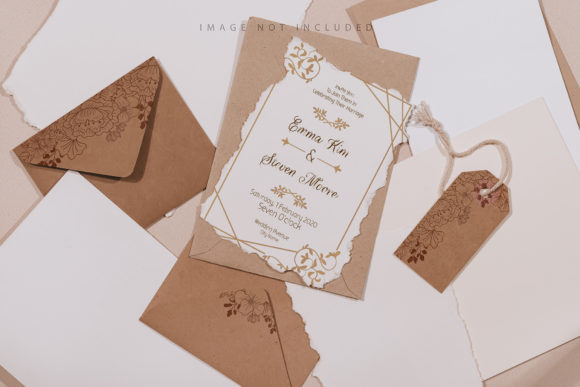
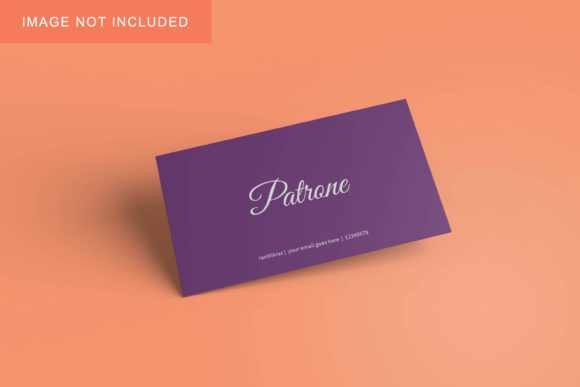
The distinction between a photo-based mockup and a 3D render is subtle but impactful. While 3D models offer flexibility in rotation and angle, they can sometimes suffer from artificial lighting or repetitive textures. The Envelope and White Card Mockup leverages actual photography to capture the nuances of paper grain, fabric texture, and ambient light. This authenticity helps stakeholders visualize how a brand will look in their hands, which is particularly important for packaging, stationery, and corporate identity projects.
It is important to note that the background and the base color of the card do not change dynamically. The mockup relies on the photographic integrity of the original image. This means that while the design is applied realistically, the environment remains static. For users who require a completely white background or a different colored surface, additional editing steps may be necessary. However, for those seeking a neutral, clean aesthetic that lets the design speak for itself, the provided white card offers a timeless and professional backdrop.
Usability and Workflow Integration
The inclusion of comprehensive documentation is a key strength of this resource. For educators, freelancers, and new users, understanding the structure of a PSD file can be daunting. Clear instructions guide users through activating layers, navigating smart objects, and utilizing the safety zones. This reduces the learning curve and ensures that the tool is accessible to a broad range of skill levels, from seasoned agency art directors to hobbyist creators.
The consistency of the output is another practical advantage. Because the lighting and shadow data are baked into the photo, every time a user drops in a new design, the result maintains the same atmospheric quality. This reliability is crucial for maintaining a cohesive brand image across multiple deliverables. Whether presenting a single business card or a full suite of envelope stations, the visual language remains uniform.
Typography Considerations
A critical aspect to understand is that the typography included in the sample design is not part of the final deliverable. The mockup comes with placeholder text to demonstrate the effect, but users must replace this with their own content. This is standard practice for professional templates, yet it requires attention. Designers should ensure that their chosen fonts are legible and scale appropriately within the constraints of the safety zone. Since the mockup does not include the font files, users must have access to the correct typefaces to avoid licensing issues or visual discrepancies.
Who Benefits Most from This Tool?
The Envelope and White Card Mockup is particularly valuable for specific segments of the design community:
- Freelance Graphic Designers: Those pitching to clients need to present concepts that look finished. Using a photorealistic mockup increases the perceived value of the work and helps justify pricing.
- Small Business Owners: Entrepreneurs launching a new product or service can use these assets to create marketing materials and social media posts without hiring a photographer for a photoshoot.
- Marketers and Content Creators: Bloggers and publishers can generate consistent, high-quality visuals for articles about branding, stationery, or business tools, enhancing the engagement rate of their content.
- Educators: Teachers can use the template to demonstrate proper layout techniques, specifically focusing on the importance of margins and safety zones in print design.
For these groups, the ability to quickly generate a "real" look from a digital file translates directly to time savings and improved client satisfaction. The 300 DPI resolution also ensures that the files are ready for direct printing if needed, adding versatility to the asset.
Practical Limitations and Recommendations
While the Envelope and White Card Mockup is robust, it is not without limitations. As noted, the background is fixed. If a project requires a dark, textured, or colorful environment, this specific file will not suffice without significant post-processing. Additionally, because it is a photo and not a vector, the perspective cannot be altered. Users cannot rotate the envelope or view it from a top-down angle; they must accept the composition as presented.
To get the best results, users should prepare their designs with the safety zone in mind before importing them. Working within the defined boundaries prevents awkward cropping and ensures the design feels intentional. Furthermore, since the file is a high-resolution PSD, users should ensure their hardware can handle the processing load, especially when working with multiple layers or large files.
Conclusion on Value and Application
The Envelope and White Card Mockup stands out as a reliable, high-fidelity tool for anyone needing to bridge the gap between digital design and physical application. Its emphasis on safety zones, combined with the realism of photographic textures, makes it superior to many generic alternatives. For professionals who prioritize accuracy and presentation, the investment in such a detailed resource pays off in the clarity and professionalism of their final outputs.
By simplifying the complex task of compositing and providing clear guidelines for safe placement, this mockup empowers designers to focus on what matters most: the message and the brand. Whether used for internal reviews, client presentations, or marketing campaigns, it delivers a consistent level of quality that enhances the overall perception of the work. For those seeking a straightforward, effective solution for displaying envelopes and cards, this tool offers a practical path forward.