Syrup Bottle Mockup: Professional 3D Showcase for Your Designs
Creating a compelling visual identity for a product is often the difference between a design that gets noticed and one that blends into the background. If you are developing branding for a food or beverage company, specifically one dealing in artisanal syrups, honey, or liquid condiments, presenting your work in a flat, two-dimensional format rarely does justice to the final product. This is where a high-quality Syrup Bottle Mockup becomes an indispensable tool. It bridges the gap between a digital concept and a tangible reality, allowing creators to present their artwork in a realistic 3D display that captures the eye of clients, customers, and stakeholders.
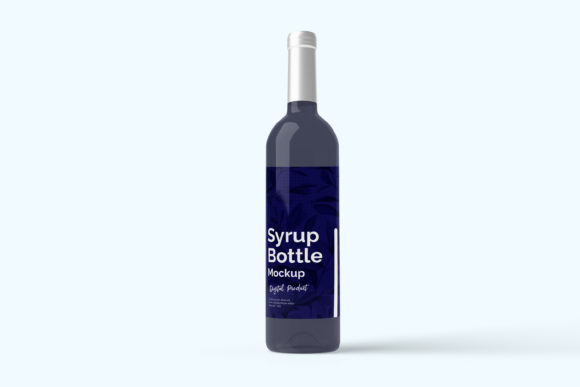
The primary purpose of this resource is to streamline the presentation process. Instead of spending hours trying to manually render a bottle with lighting, shadows, and reflections in complex software, you can utilize a pre-built template designed for speed and accuracy. The core value lies in its ability to let you replace the design easily and quickly using smart-object features. This means that within seconds, you can swap out the default label with your own creative work, seeing exactly how it wraps around the curve of the glass or plastic container.
Why Realistic 3D Presentation Matters
In today’s digital-first marketplace, first impressions are almost always visual. Whether you are pitching a new brand to a potential investor, uploading a listing to an e-commerce platform like Etsy or Amazon, or showcasing your portfolio on social media, the quality of your imagery speaks volumes. A Syrup Bottle Mockup offers a level of professionalism that static images simply cannot match.
When a client sees their logo applied to a realistic bottle sitting on a kitchen counter or against a clean studio backdrop, they can better visualize the end result. This reduces uncertainty and builds confidence in the design. For freelancers and agencies, this translates to faster approval times and fewer revision rounds because the client understands exactly what they are getting. It transforms abstract graphics into a concrete product experience.
Key Features That Drive Efficiency
Not all mockups are created equal. The specific features of this PSD file are tailored to address common pain points designers face during the workflow. Here is a breakdown of why these specifications matter:
- Smart-Object Technology: This is the heart of the utility. You do not need advanced Photoshop skills to use this effectively. Simply double-click the smart-object layer, paste your design, save, and close. The mockup automatically adjusts perspective, lighting, and curvature to fit your artwork perfectly.
- High Resolution (300 DPI): At a size of 3000x2000 pixels, the file provides ample detail for both web and print uses. This resolution ensures that when you zoom in on the label texture or the glass refraction, there is no pixelation or blurriness.
- Changeable Background Color: Versatility is key in marketing. Sometimes a white background works best for a clean look, while other times a dark, moody tone highlights the product’s elegance. Being able to change the background color allows you to create multiple variations from a single file, catering to different marketing channels.
- User-Friendly Guide: Understanding that not everyone is a Photoshop expert, the inclusion of a PDF help guide ensures that beginners can get started without frustration. It demystifies the process of layer management and smart-object usage.
Who Can Benefit from This Tool?
The versatility of a Syrup Bottle Mockup makes it suitable for a wide range of professionals and hobbyists. While graphic designers are the obvious users, the scope extends much further.
Small Business Owners and Entrepreneurs: If you are launching a line of maple syrup, vanilla extract, or hot sauce, you likely have a limited budget for professional photography. This mockup serves as a cost-effective alternative, allowing you to create store-ready images without hiring a photographer or setting up a studio.
Marketers and Bloggers: Content creators need fresh, engaging visuals to keep their audience interested. Using this mockup, you can generate unique images for blog posts, email newsletters, and social media campaigns. The ability to quickly swap designs means you can test different color palettes or label concepts to see which performs better with your audience.
Educators and Students: For those teaching branding or packaging design, this tool offers a practical way to demonstrate how theoretical designs translate into real-world applications. It helps students understand scale, proportion, and material interaction in a hands-on manner.
Practical Use Cases and Contexts
Imagine you have just finished designing a label for a boutique lavender syrup. You want to show how it looks on a shelf alongside competitors. By applying your design to the mockup, you can create a scene that mimics a retail environment. Or perhaps you are creating a gift set image for the holidays. The realistic 3D display adds depth and appeal, making the product look more premium and desirable.
Furthermore, the ease of use encourages experimentation. Designers can try out multiple font pairings, color schemes, and layout options rapidly. This iterative process fosters creativity and often leads to stronger final designs. The quick turnaround time—replacing designs within seconds—means you are not bogged down by technical hurdles, allowing you to focus on the creative aspects of your project.
Important Considerations Before You Start
While this tool is powerful, there are a few things to keep in mind to ensure the best results. First, always check the dimensions of your source file before importing it into the smart object. If your design is too small, it may appear pixelated; if it is too large, it may be cropped unexpectedly. Planning your canvas size according to the mockup’s requirements will save you time and prevent errors.
Additionally, remember that the photos used in the preview are for illustration purposes only. They are not included in the download. This is standard practice in the industry, but it is important to understand that you are purchasing the template structure, not the lifestyle imagery. You will need to provide your own design content to populate the mockup.
Finally, ensure you have Adobe Photoshop installed on your computer, as the file is provided in PSD format. While the PDF guide helps with navigation, basic familiarity with Photoshop’s interface will make the process even smoother. However, thanks to the intuitive smart-object system, even those with minimal experience can achieve professional-looking results.
Conclusion
A Syrup Bottle Mockup is more than just a template; it is a strategic asset for anyone looking to present their designs with clarity and impact. By combining high-resolution realism with user-friendly smart-object technology, it removes the barriers between idea and execution. Whether you are a seasoned pro looking to speed up your workflow or a beginner eager to showcase your first creation, this tool empowers you to communicate your vision effectively. Embrace the convenience and professional polish it offers, and watch your designs come to life in a way that resonates with your audience.