Frame Mockup with Yellow Tulips: A Practical Evaluation for Designers
In the competitive landscape of graphic design, visual presentation is often as critical as the creative work itself. Professionals frequently seek tools that can elevate their portfolio pieces or client presentations without introducing unnecessary complexity. One such tool gaining attention among designers is the Frame Mockup with YellowTulips. This resource offers a realistic, high-quality backdrop featuring yellow tulips and a blank picture frame set against a white marble background. For designers evaluating mockup assets, understanding the specific features, technical specifications, and practical applications of this file is essential to determining its value for their workflow.
Understanding the Asset Composition
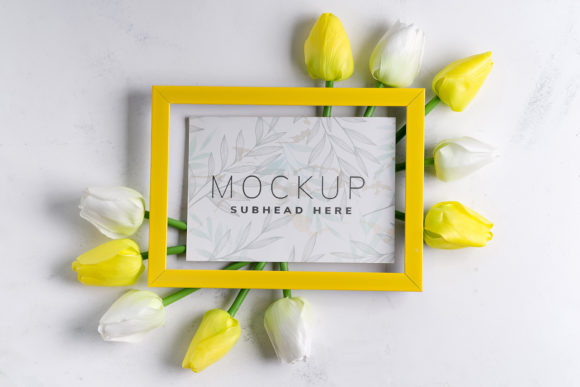
The core appeal of the Frame Mockup with YellowTulips lies in its aesthetic composition. The image presents a clean, modern scene characterized by a white marble surface, which provides a neutral yet sophisticated foundation. Scattered across this surface are fresh yellow tulips, adding a touch of organic vibrancy and color contrast. Central to the composition is a blank picture frame, positioned to serve as the focal point for design integration.
This setup is particularly effective for projects requiring a balance between natural elements and structured design spaces. The presence of the tulips suggests themes of spring, renewal, elegance, or freshness, making it suitable for industries ranging from floral branding to lifestyle marketing. However, because the background elements are photographic rather than vector-based, they remain static. The background color does not change, nor do the tulips shift in orientation. This fixed nature is a crucial consideration for designers who require highly customizable environments where lighting or background tones must match a specific brand palette exactly.
Technical Specifications and Workflow Integration
For professionals working within Adobe Photoshop, the technical structure of the mockup file determines how easily it can be integrated into existing projects. The Frame Mockup with YellowTulips is provided as a high-resolution PSD file, measuring 6016×4016 pixels. This dimension ensures that the output is sharp enough for both digital display and high-quality print materials. Furthermore, the file is rendered at 300 DPI, meeting industry standards for professional printing requirements.
The primary mechanism for applying designs to this mockup is the use of smart objects. The asset includes an active smart object layer dedicated to the picture frame. To utilize this feature, designers simply need to open the smart object layer, paste their own design, save the changes, and close the window. The mockup will then automatically update to reflect the new artwork, complete with realistic perspective and lighting effects inherent to the original photograph.
A distinctive feature of this particular mockup is the inclusion of a "safety zone." This element addresses a common challenge in mockup usage: ensuring that important design elements do not get cropped out or obscured by the physical edges of the frame in the final render. The safety zone is defined by lines indicating the area within the smart object that remains visible after application. By activating the specific layer containing these guides, designers can visualize the boundaries before saving their work. This precautionary measure streamlines the creative process, reducing the risk of errors and rework.
Evaluating Benefits and Tradeoffs
When considering whether to incorporate the Frame Mockup with YellowTulips into a project, it is important to weigh its advantages against potential limitations. On the positive side, the use of a real photograph rather than a 3D render or vector illustration offers a level of authenticity that is difficult to replicate digitally. Textures on the marble and the petals of the tulips possess natural imperfections and lighting nuances that lend credibility to the final presentation. This realism can significantly enhance the perceived quality of a designer’s work when presenting to clients.
Additionally, the inclusion of documentation and clear instructions supports users who may be less familiar with advanced Photoshop techniques. The explicit mention of the safety zone demonstrates a user-centric approach, aiming to make the workflow more convenient and less prone to mistakes. For quick turnaround projects or bulk presentations, this ease of use is a significant benefit.
However, there are tradeoffs to consider. As noted, the background and design colors are static. If a project requires a monochromatic scheme or a specific background hue to align with strict brand guidelines, this mockup may not be adaptable without extensive post-processing outside of the smart object function. Furthermore, typography is not included in the design application. While this allows for total freedom in font selection, it also means that any text overlays must be added manually in subsequent editing steps, which adds time to the workflow if not anticipated.
Strategic Use Cases and Alternatives
The Frame Mockup with YellowTulips is a strong fit for specific scenarios. It is ideal for designers creating social media content for brands associated with spring collections, wellness products, or artistic portfolios. The vibrant yellow of the tulips draws the eye, making it an excellent choice for capturing attention in crowded digital feeds. Similarly, interior designers or architects might use this mockup to showcase artwork prints, leveraging the elegant marble and floral context to suggest a luxurious home environment.
Conversely, there are situations where alternative resources might be more appropriate. If a designer needs to present a logo on a product packaging box, a flat lay of clothing, or a digital interface, this frame mockup would be irrelevant. Additionally, for projects demanding dynamic background colors or the ability to rotate the frame angle freely, a 3D-rendered mockup would offer greater flexibility. The static nature of this photographic asset means it serves best as a specialized tool for specific aesthetic goals rather than a universal solution for all design presentations.
Conclusion
Selecting the right mockup asset depends on aligning the tool’s capabilities with the project’s specific requirements. The Frame Mockup with YellowTulips offers a polished, realistic, and user-friendly option for showcasing framed designs. Its high resolution, smart object functionality, and thoughtful safety zone features make it a reliable choice for professionals seeking to add a touch of natural elegance to their presentations. While it lacks the color adaptability of 3D renders, its photographic authenticity provides a distinct advantage in contexts where realism and aesthetic warmth are prioritized. By carefully assessing these factors, designers can determine if this asset complements their creative vision and workflow efficiency.