Mockup Hanging Gift Tags: A Designer’s Guide to Flawless Presentation
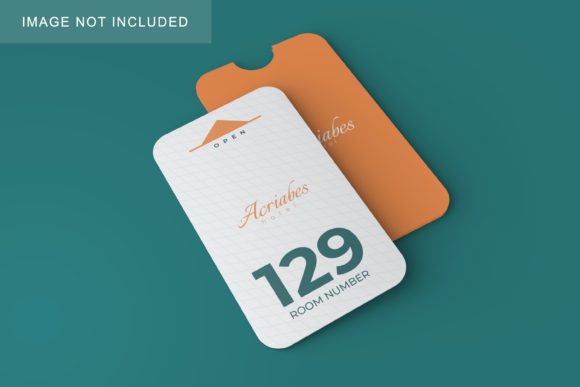
Presenting your creative work effectively is just as important as the design itself. Whether you are a small business owner packaging handmade jewelry, a graphic designer submitting a brand identity package, or an educator creating classroom materials, first impressions matter. This is where Mockup Hanging Gift Tags become an indispensable tool in your workflow. These mockups allow you to showcase your tag designs in a realistic, high-quality environment without needing to physically print and photograph every single prototype.
The core value of using these specific mockups lies in their efficiency and realism. Instead of spending hours setting up lighting, props, and backgrounds for a photoshoot, you can use a digital solution that mimics real-world photography. By utilizing the smart layer object feature, you can drop your designs directly into the file, ensuring that your typography, logos, and illustrations appear exactly as they would on a physical product. This process saves time while maintaining a professional standard that appeals to clients and customers alike.
Understanding the Smart Object Workflow
For those new to Adobe Photoshop or digital mockups, the concept of a "smart object" might seem technical, but it is actually designed to make your life easier. The primary advantage of this Mockup Hanging Gift Tag set is its user-friendly interface. You do not need to be an expert photo editor to achieve stunning results. The workflow is straightforward and intuitive.
To begin, you simply open the provided .psd file. Inside, you will find a designated area for your artwork. The instruction is simple: paste your design into the smart object layer. Once you have placed your image, save the changes within that layer. The mockup automatically updates to reflect your new design, applying realistic shadows, folds, and textures to give it depth. This automation ensures that your flat digital design looks like a tangible, three-dimensional object hanging from a string or ribbon.
This method eliminates the guesswork involved in manually warping images to fit curved surfaces. The smart object handles the perspective and lighting adjustments for you, allowing you to focus entirely on the creative aspect of your tag design. It is a seamless integration of technology and creativity, designed to streamline the presentation phase of your projects.
The Importance of the Safety Zone
One of the most thoughtful features included in this mockup set is the active Safety Zone. When working with hanging tags, it is crucial to ensure that critical elements of your design—such as text, barcodes, or central logos—are not cut off or obscured when the tag is attached to a box or gift. The safety zone acts as a visual guide, marking the boundaries where content should remain clear and unobstructed.
In the PSD file, these zones are represented by specific lines that define the safe area for the smart object. To see them clearly, you just need to activate the relevant layer. This feature is particularly helpful for beginners who might struggle with alignment and spacing. By keeping your essential design elements within these marked lines, you guarantee that your final output looks polished and professional. It prevents common mistakes where important information gets hidden behind folds or attachment points, ensuring that your message is always visible to the recipient.
High-Quality Specifications for Professional Results
When selecting a mockup, resolution and format are key factors that determine the quality of your final presentation. This particular set offers a resolution of 6016×4016 pixels, which is more than sufficient for both web use and high-resolution printing. At 300 DPI (dots per inch), the images retain crisp details even when viewed up close. This high fidelity is essential for showcasing intricate patterns, fine typography, or subtle color gradients in your gift tag designs.
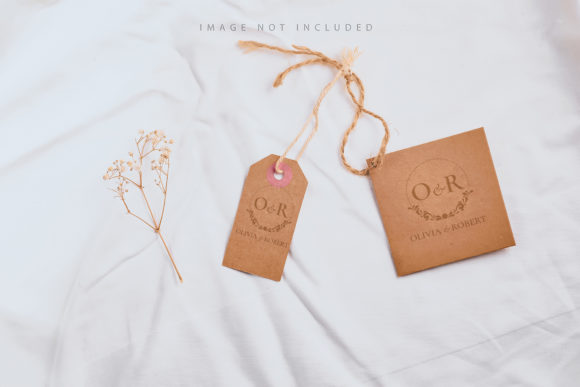
It is also important to note that these are photographic mockups, not 3D renders or vector illustrations. This distinction matters because photos capture natural light, texture, and imperfections that add authenticity. A 3D render can sometimes look too perfect or artificial, whereas a photo-based mockup provides the organic feel that customers expect. The background or design color remains consistent, providing a neutral canvas that lets your artwork stand out without distraction. However, please remember that any applied typography shown in the preview is NOT INCLUDED. You must provide your own text and graphics, giving you full creative control over the final look.
Practical Applications Across Industries
The versatility of Mockup Hanging Gift Tags makes them suitable for a wide range of users. Small business owners in the e-commerce space can use these mockups to create compelling product listings on platforms like Etsy, Shopify, or Amazon. A well-presented tag can increase the perceived value of a product, encouraging higher conversion rates. For entrepreneurs launching a new brand, these mockups offer a cost-effective way to visualize branding guidelines before committing to mass production.
Creatives and freelancers benefit significantly from the speed and ease of use. Designers can quickly generate multiple variations of a tag design to present to clients. Instead of showing a flat JPEG, they can display a realistic mockup that helps clients visualize the end product. This capability enhances communication and reduces the number of revision rounds, saving valuable time. Bloggers and marketers can also utilize these images for social media content, creating visually appealing posts that drive engagement and traffic to their stores.
Educators and hobbyists may find these tools useful for teaching design principles or personalizing gifts. By demonstrating how digital designs translate to physical objects, teachers can provide students with practical insights into packaging and presentation. Hobbyists can experiment with different fonts and colors to create unique, personalized tags for friends and family, adding a special touch to homemade presents.
Considerations Before You Start
While these mockups are powerful tools, there are a few things to keep in mind to get the best results. First, always ensure your source design is high-quality. Since the mockup is 300 DPI, low-resolution inputs will result in pixelated outputs. Second, pay close attention to the safety zone. Even though the smart object automates the placement, it is your responsibility to ensure that no vital information falls outside the safe area. Finally, remember that the mockup shows a static representation. If you need to show how the tag looks attached to different colored boxes or in various lighting conditions, you may need to purchase additional variations or adjust the background layers manually if the template allows.
By understanding these nuances and leveraging the smart object capabilities, you can produce professional-grade presentations that elevate your brand. The combination of high-resolution imagery, intuitive editing features, and realistic photographic qualities makes this Mockup Hanging Gift Tag set a valuable asset for anyone looking to enhance their visual communication. Whether you are designing for commercial sale or personal use, taking the time to present your work beautifully demonstrates professionalism and care, ultimately leaving a lasting impression on your audience.