Floating Postcard Mockup for Professional Design Presentations
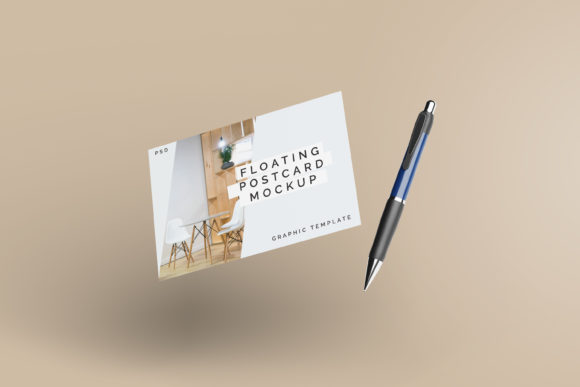
In the competitive world of visual communication, how you present your work is just as critical as the work itself. A Floating Postcard Mockup offers a sophisticated solution for designers seeking to elevate their portfolio presentations and client pitches. By simulating a realistic 3D environment, this asset transforms flat digital files into tangible, immersive experiences that capture attention immediately. It bridges the gap between abstract design concepts and real-world application, allowing stakeholders to visualize the final product with clarity and impact.
The Power of Realistic Visual Presentation
When showcasing creative assets, static screenshots often fail to convey depth, texture, or scale. A floating postcard mockup addresses this limitation by introducing dynamic lighting, shadows, and perspective. This level of realism helps establish a strong brand identity before the viewer even reads the content on the card. Whether you are presenting a new logo design, a typography experiment, or a complete branding package, the mockup provides a professional context that enhances credibility.
This tool is particularly valuable in digital marketing and social media graphics, where first impressions dictate engagement rates. A polished presentation suggests attention to detail and high-quality standards, influencing how clients perceive the value of your services. By using a modern aesthetic that mimics physical media, you ground your digital designs in a relatable reality, making them more memorable and persuasive.
Streamlining Your Design Workflow
Efficiency is paramount in any creative project. The Floating Postcard Mockup is engineered to integrate seamlessly into your existing design workflow without requiring advanced technical skills. Available in PSD Photoshop format, it leverages smart-object features to allow for rapid customization. This means you can replace the current placeholder designs with your own artwork within seconds, maintaining the integrity of the lighting and shadows throughout the process.
The inclusion of a PDF help guide ensures that even those less familiar with complex Photoshop layers can navigate the file with ease. With a resolution of 300 dpi and a generous size of 3000x2000 px, the mockup supports high-resolution outputs suitable for both web display and print-ready materials. Additionally, the ability to change the background color allows you to tailor the presentation to specific campaign themes or brand palettes, ensuring consistency across all your visual communications.
Key Features at a Glance
- Smart-Object Integration: Effortlessly swap out designs while preserving realistic 3D effects.
- High Resolution: 3000x2000 px dimensions at 300 dpi ensure crisp, clear details.
- Customizable Backgrounds: Adjust colors to match your brand identity or project mood.
- User-Friendly Format: Includes a PDF guide for quick setup and editing.
Practical Applications Across Industries
The versatility of this mockup extends beyond simple postcards. It serves as an excellent template for various design disciplines, from editorial design to packaging design. Here are several ways you can utilize this resource to enhance your creative projects:
- Branding and Logo Design: Showcase logo variations on different backgrounds to demonstrate versatility and scalability.
- Social Media Content: Create eye-catching posts for Instagram or LinkedIn that stand out in crowded feeds.
- Web and UI/UX Design: Illustrate mobile app interfaces or website headers in a contextual, three-dimensional space.
- Packaging Design: Use the postcard format to present label designs or promotional inserts for physical products.
- Advertising Campaigns: Develop cohesive visual narratives for email newsletters or digital advertisements.
- Miscellaneous Merchandise: Apply designs to business cards, event invitations, or digital gift certificates.
Enhancing Visual Hierarchy and Readability
Effective visual design relies on a clear hierarchy that guides the viewer’s eye. When using a Floating Postcard Mockup, consider how the curvature and angle of the card affect text legibility. Ensure that your typography remains sharp and readable despite the simulated perspective. Choosing a complementary color palette that contrasts well with the mockup’s lighting will further improve readability and aesthetic appeal.
Furthermore, think about the composition of your layout. How does the negative space interact with the floating effect? Balancing bold graphical elements with clean typography creates a harmonious look that aligns with contemporary design trends. Remember, the goal is not just to display your work but to communicate its purpose effectively.
Ultimately, investing in high-quality creative assets like this mockup pays dividends in how your work is received. It elevates your professional presentation, strengthens your brand’s visual language, and facilitates clearer communication with clients and audiences. By combining thoughtful design choices with powerful tools, you create a lasting impression that resonates long after the initial view.